| Guideline: Logical Roles Model |

|
 |
 |
|
PurposeA primary purpose of modeling actors is to describe how the activities are interacted with by various internal and external actors, and most importantly by its customers and partners. All interactions of actors with activities are defined. Employees that interact with activities and process are also modeled as actors. The Logical Roles Model shows the primary person responsible for a task. The Logical Roles Model will contribute to the definition of new / revised job descriptions. Note: Roles are not defined at the business level—they are define in the Logical Perspective. This is because roles imply a decision regarding the implementation of the associated activity (i.e., manual, user, or automated). These decisions are only made at the Logical level. Therefore only Actors are defined, but roles defined at the Logical level may be added to the Business Roles Model if desired. SecuritySecurity is another important aspect of the logical roles model—at least a start is made at understanding this aspect, with it being finalized in the Technical Roles Model. By modeling the roles, and optionally the roles that different kinds of users require, a good picture of the security required within the processes and systems involved is created.
This model, along with the logical process model will indicate how the roles structure relates to tasks and processes, and therefore in turn what access and actions these roles need to have to logical entities. The appropriate IT security construct my then be defined to support these required accesses and processes. Diagrams used in the logical roles model are:
Roles Summary DiagramA roles summary diagram is used to detail the structure of Actors and also of Roles. It also shows the relationships between Actors & Roles and logical activities. At the business level roles model was very simple, but at the logical level the architectural decision required to detail roles are made (i.e., automation vs. manual vs. interactive)—with this analysis and details being defined at the logical level the roles are properly defined. The main objective of the logical roles model (once the set of roles is defined) is to understand the structure of the roles and actors in the Summary Diagram. This structuring supports two objectives:
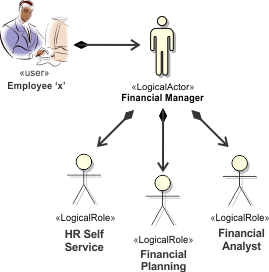
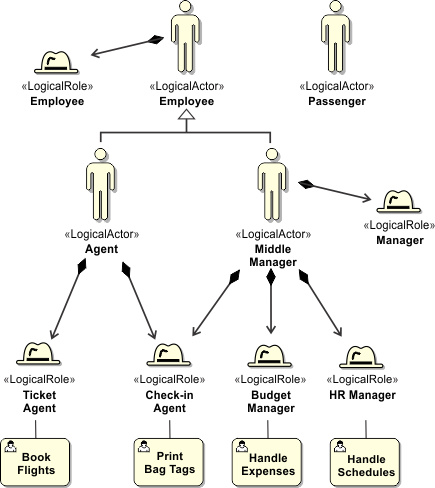
This diagram is used to define the structure of roles and actors that interact with the system, which is important to do at the logical level, as noted above. This structure reveals how the GUIs or interfaces to the system's activities are shared or used, by the various roles, or by specific (or generalized) actors with the system.
For example, if required and useful, a diagram similar to the above could be produced to illustrate the roles assumed by various employees or classes of employees, within the system. The structure defined here has direct implications on the system and Technical level solutions in terms of how logical activities collaborate, and on the IT security measures required to secure the more sensitive logical activities.
In this example a Middle Manager actor is shown (and stereotyped as «LogicalActor») as assuming the following roles:
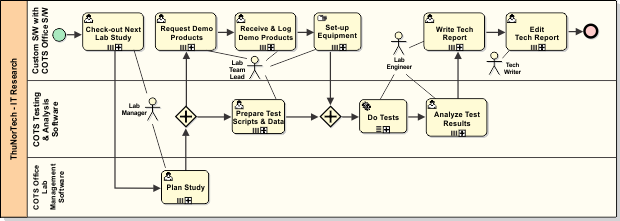
Note that all roles interact with and are defined by "User Activities" or "Manual Activities". Roles in ContextA "roles-in-context" diagram is used to detail the interactions of roles and actors with the activities in the system. This example diagram is similar to the one above, the ThuNorTech process Perform Lab Study, but is a simplified version showing only the relevant activities and with extraneous information removed, but with the roles added.
GUI OptimizationPart of the analysis of the Roles Model is the optimization of the interface needed by Users and Actors. Analysis of the processes in association with users, actors, and roles provides a complete picture of what is involved from the user perspective. This end-to-end process and interface analysis defines the cohesion of interfaces, the set of interfaces involved along with how these interfaces relate to each other. Therefore, optimizations of these interfaces, of the GUIs, can be defined. There will be GUIs in systems that don’t necessarily correspond to an activity in the process model; for example, monitoring roles, reporting roles, client support roles (i.e., lookup tasks). How will this come into play in this approach to modeling? Do these have to be included in the Logical Process Model somehow? The importance of these aspects of the GUI will dictate how to handle them in the Roles Model. If important enough, these roles and associated interfaces (GUIs) should be included in the models, along with how they relate to the other GUIs (e.g., are they integrated or separate, or some other approach). RBACGoing too granular with roles is difficult to manage, but aggregating roles too much is inflexible. Define a correlation (RBAC) grid and analyze the optional through various grid structures in terms of Actors vs. Users vs. Roles vs. activities. Once this is understood and finalized, the difficult and complex job of drilling down into individual user/actor/role actions becomes easier. In the example above, for example, would it better for the "Agent" to have the "Check-in Agent" role, the "Ticket Agent" role, and "Agent Manager" role that is a sub-type of "Middle Manager". A whole set of analysis is done to understand and optimize this structure—this is at the heart of the Roles Model. This analysis often isn’t done or at best poorly understood. The end result is to define the mapping of roles to privileges at the technical level—part of the Technical Roles Model. A matrix is used to capture this RBAC information. Two kinds of matrixes are used, either the protected object centric or the set of protected objects presentation. They both capture the same information, but the latter may be more practical in terms of managing and using the information. Also see: Guideline: CRUD Matrix. RBAC permissions matrix for Protected Object “X”
RBAC permissions matrix for a set of Protected Objects
RBAC (coarse) permissions matrix for activity Protected Objects (logical)The activities in a process are in the first column (from the Perform Lab Study process diagram above), and associated with defined roles. At the Logical level the analysis of roles is incomplete complete. Optimizations need to be explored and defined; optimizations of roles and also of associated GUIs. In the table below, the Lab Manager role is naturally allowed to do all of the activities, except Edit Tech Report.
For the optimized definition, see: Technical Roles Model. |

| © David W. Enstrom, 2025. All rights reserved. |